
Moxn: Git-like version control for documents, built for AI agents
Git-like branching and merging for docs. A filesystem interface for agents. A collaborative editor for humans.
The problem
Even before AI reshaped how we work, there were reasons to want docs to behave more like repos:
- With multiple users live-editing the same doc, content bounces around in the UI as collaborators nudge things above and below.
- Iterative writers don't want the full audience seeing WIP edits, but branching isn't an option.
Collaborating with AI added two more pain points:
- Multiple agents live-editing the same doc leads to clobbers and deadlocks, or file replication and name-based versioning.
- Lack of granular agent-specific permissions.
The common options help, but come with tradeoffs:
- Git + markdown works well for agents and individual work on a machine, but teams lose multiplayer editing.
- Notion and Google Docs work better for teams, but agents have to go through APIs that weren't designed for filesystem-style exploration. The versioning is revision-based, not branch-based, and search is flat. The Onyx team found that on complex multi-document questions at ~160k documents, agents using filesystem-style exploration beat hybrid retrieval on document recall, 76% to 57%.
Filesystems are a shared primitive. They are the most common interface humans have used for organizing files on machines, and agents have already demonstrated success navigating local codebases and disks. The hierarchy gives agents the same advantage a well-organized folder system gives a human: navigate to the right neighborhood before reading. Add tags and databases for cross-cutting dimensions and the agent controls retrieval instead of delegating relevance entirely to an embedding.
Moxn is an attempt to combine the git + markdown and Notion/Google Docs worlds to support iterative development and collaboration on content.
What we built
For humans: the editor
The editor is where taste lives. An agent can produce ten drafts in a minute, but deciding which sentences to keep and finalizing the finishing touches is still a human job. It's a job that needs multimodal content support, multiplayer editing, comments, and the ability to react to structure visually. Leaving feedback and asking questions through comments is a collaboration method we now can't live without.
In Moxn each document is a collection of sections, which manage their own content, references, and optional permission overrides.
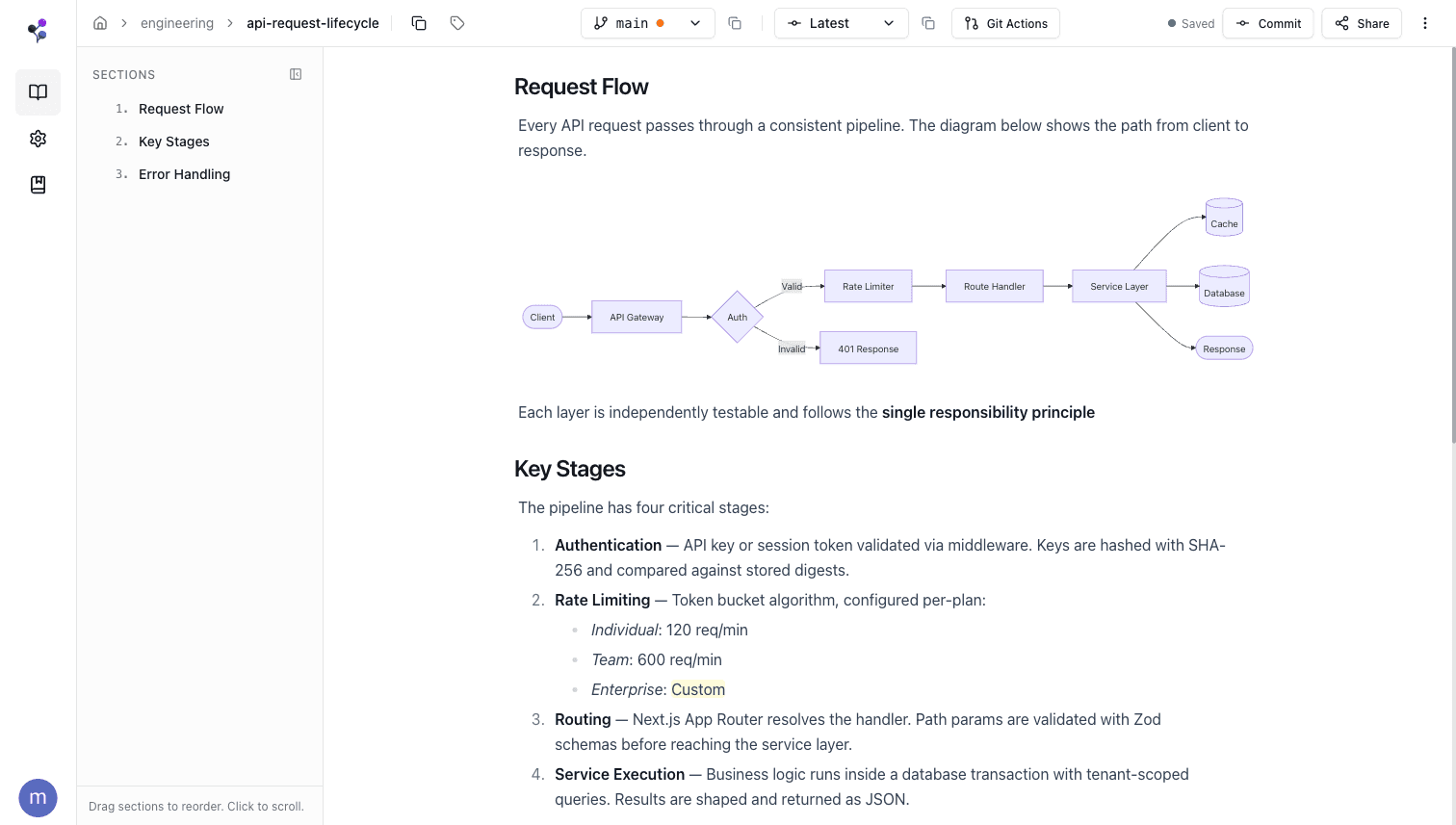
The Moxn editor — section-based, multiplayer.
Commits are branch-scoped and a commit history UI allows you to walk through the diffs to see what changed, not just in plain text but with content rendered. Merges default to carrying forward commit messages from the source branch so log and show tools can provide agents more context about the evolution of the doc in the future.
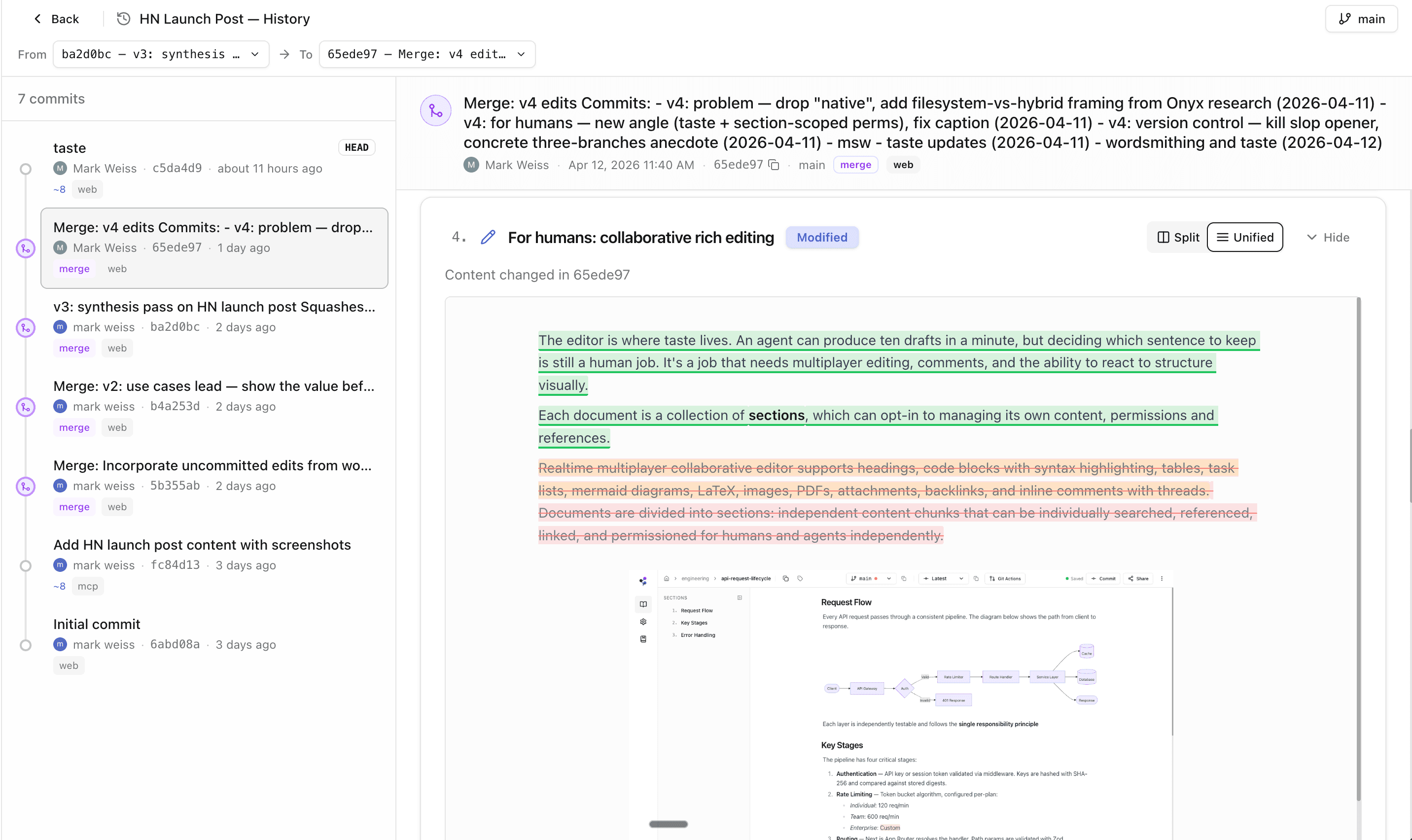
Commit history diff UI with rich content rendering.
For agents: a filesystem
Agents connect via MCP or a dedicated CLI. Both expose the same set of operations: glob-like find to discover files by path or name, search for full-text queries, read to get content, and sections to create and update content blocks. Agents have feature parity with humans in the browser across tags, databases, and filesystems. That unlocks knowledge bases that can be self-organizing when you want agent autonomy, or human-steered when taste and control matter.
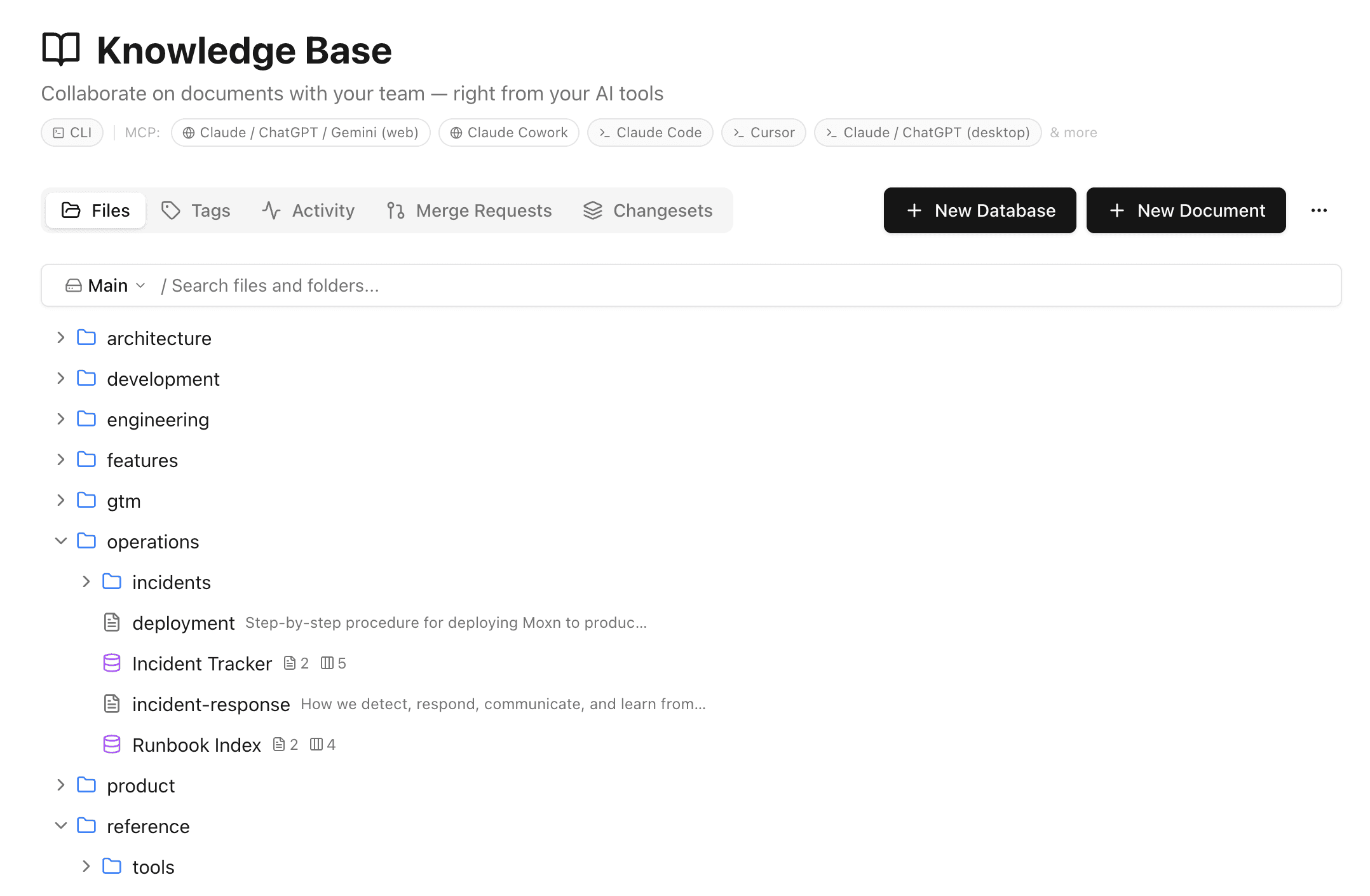
Filesystem-like navigation that agents traverse via MCP or CLI.
filesystems provide a strict isolation mechanism. Within a filesystem, a user can have read, comment, edit, or none access per document. Even with none, they can see that the document exists. Users without access to the filesystem at all cannot see the file structure, its documents, or its contents.
Version control: branching
Each document has its own branches. Humans and agents can write directly to main for quick updates. When you want isolation or review, you create a branch, edit, and open a merge request. Merging uses a common ancestor to identify conflicts. Diffs are shown at the section grain, whether a section applies cleanly or requires conflict resolution.
Under the hood, edits flow into the CRDT (Yjs + TipTap), get flushed to mutable draft rows, and freeze into immutable snapshots on commit. Edits have git staged semantics and agents default to auto-commit.
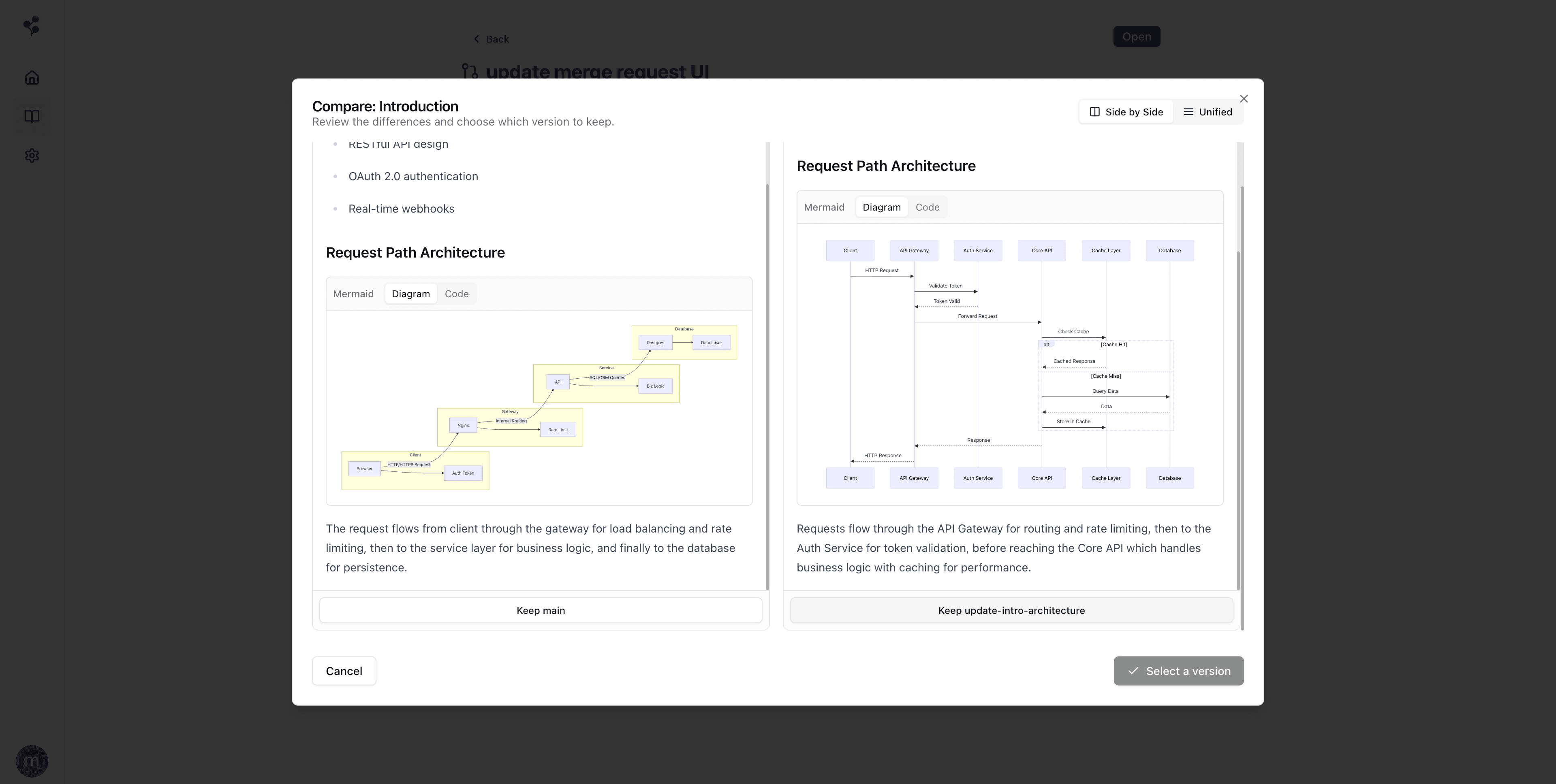
Side-by-side merge conflict resolution with rich content rendering.
Branching solves the concurrency problem: multiple agents work in parallel without deadlocking, and a human (or another agent) reviews and merges when ready.
The iteration loop
Fan agents out on parallel branches to propose candidates, read the diffs in merge requests, cherry-pick the chunks worth keeping, drop into the editor to refine, and loop. This post was written that way.
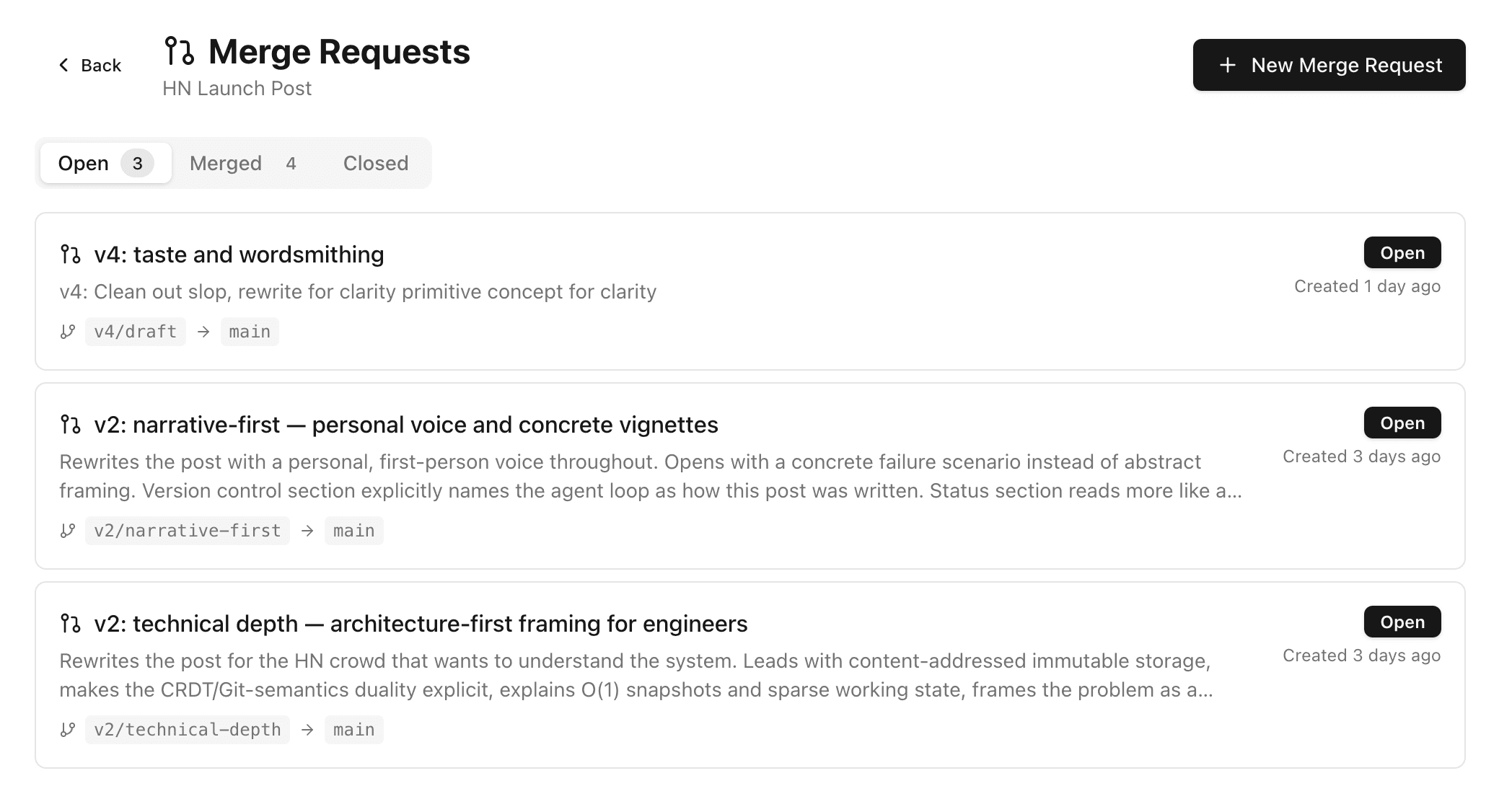
Merge requests from parallel agent branches used to write this post.
Structured data beyond docs:
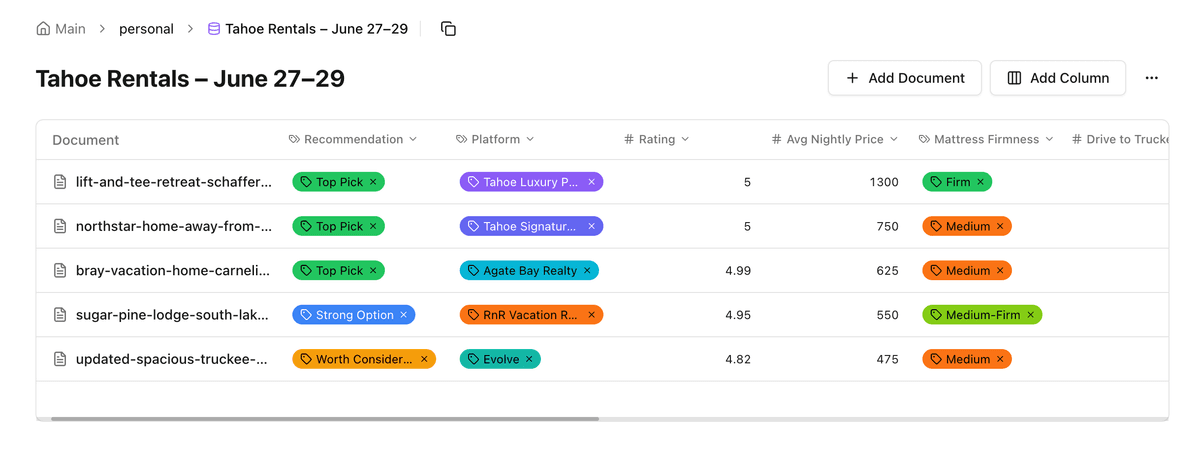
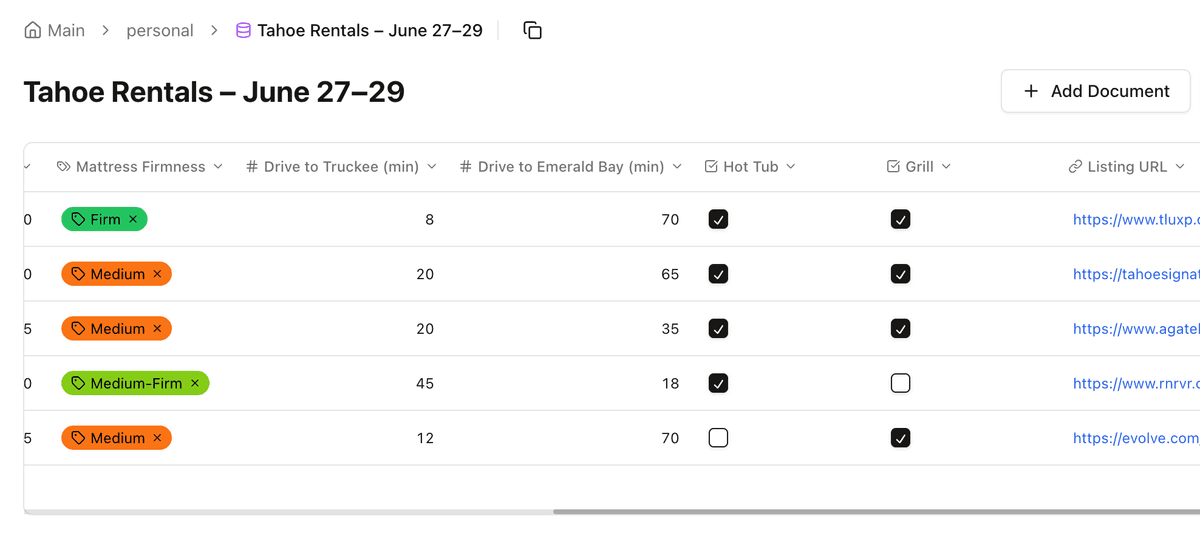
- Trip planning: agents scrape property listings and populate typed columns with the details you actually care about — drive time, mattress firmness, whether there's a hot tub, reviews, images. A skill turns a messy comparison into a structured one.
- A personal CRM: a database with contacts and prospects as pages, dated sections for history, tags for organization, with reads and writes accessible from any AI interface that supports MCP.
Where we are, honestly
We're using this daily. Here's where the gaps are.
- Editor cold start & polish. No local-first sync yet. Noticeable lag opening a document. We're actively redesigning for document-open performance. Notion is truly an incredible experience for humans on the web and we're fans of Obsidian. Moxn's editor is improving daily and we know we have a journey in front of us.
- Search scope. Full-text search only covers the default branch — expanding to all branches and enabling search hits on history and metadata directly is on the roadmap.
- Enterprise features like audit logging are on the roadmap but not currently prioritized.
Try it
moxn.dev—There is a free plan, no credit card required. Individual and Team paid plans come with a 60-day free trial. Use code LAUNCH for 50% off your first year.
Import your existing content from Notion or markdown to get started. If you later want out, the CLI exports everything. If you hit any issues migrating in or out, reach out—we'll prioritize it.
We'd love feedback, especially if you've pointed AI agents at your team's docs and hit the same walls we did. Join our Slack and let us know what you think.